
Tiger Exchange Login
Tiger Exchange login needs your username, your password and the current link. All three arrive in your WhatsApp chat with the ID.
No ID yet? Get a Tiger Exchange ID first.
Login screen checked 22 September 2026.
Tiger Exchange login in 6 steps
Six steps. About a minute on mobile data.
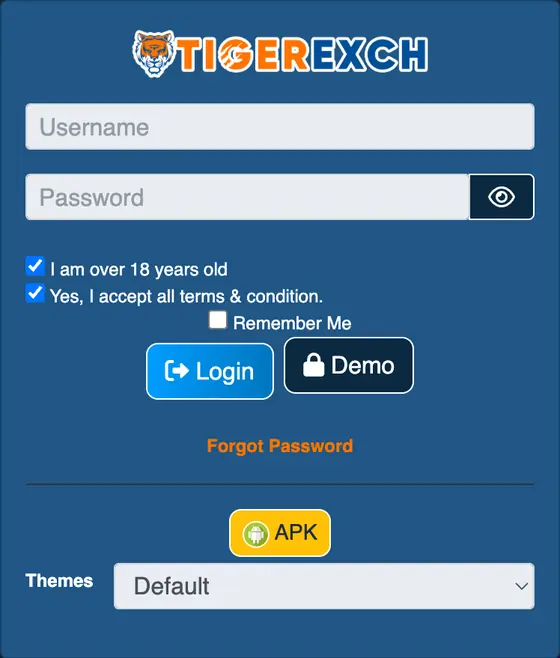
- Open the Tiger Exchange link from your chat. The home screen shows “Login” and “Sign Up” at the top.
- Tap “Login”. A box opens with “Username” and “Password”.
- Type the username exactly as sent. Capital letters count.
- Type the password. Tick “Remember Me” only on your own phone.
- Check both boxes stay ticked: “I am over 18 years old” and “Yes, I accept all terms & condition”. They come ticked.
- Tap “Login”. The sports screen loads. “Balance” and “Exp” show at the top.
Done.
Get my login link on WhatsAppFirst login: set your own password
The password in the chat is a starting password. Replace it on day one.
- Log in with the password from the chat.
- If a new-password screen appears, fill it now.
- If not, open the account menu. Find “Change Password”.
- Type the old password once. Type the new one twice.
Password characters: letters, numbers and @. The Tiger Exchange sign-up form accepts only these.
Use a password you use nowhere else. Save it in your phone’s password manager.
TigerExch 365 login and Tiger 365 app login
TigerExch 365 login uses the same six steps. Tiger Exchange 365, TigerExch and Tiger Exch are one brand.
Your username works on the address it was made for. That address comes with the ID in your chat.
- Tiger 365 app login. Open the APK. Same username, same password. Install help: Tiger Exchange app download.
- Tiger 365 Pro login. A separate site with its own accounts. A desk ID does not carry over. Details: Tiger 365 Pro.
- Tiger Exchange 247 login. An older address name. Status and moving to a live link: Tiger Exchange 247 login.
Forgot password: Tiger Exchange login password reset
Two routes. Pick by where your ID came from.
- ID from the WhatsApp desk
- Ask for a reset in the same chat. A new password comes back there.
- ID from Sign Up on the site
- Tap “Forgot Password” in the login box. The reset runs through the mobile number you registered.
A password reset never needs your UPI PIN, and an OTP belongs only in the site’s own reset box, never in a chat.
Tiger Exchange login problems and fixes
Eight faults. Each fix fits in one line.
- “Invalid username or password”?
- Type both by hand. Check caps lock. Delete any space after the last character.
- Locked after wrong tries?
- Stop typing. Ask for an unlock in the chat.
- Login page will not open?
- The address may be dead. Ask for the current link.
- Opens on mobile data, fails on Wi-Fi?
- That Wi-Fi network blocks the site. Stay on mobile data.
- Logged out every few minutes?
- Clear site data for that address in Chrome. Log in once more.
- Login button does nothing?
- Both boxes under the password must stay ticked. Tick them again, then tap.
- Balance shows zero after paying?
- Send the payment screenshot in the chat. Steps: Tiger Exchange deposit.
- Play balance instead of yours?
- You opened “Demo”. Log out. Tap “Login” instead.
Demo login: look before you pay
The login box has a “Demo” button. Some Tiger Exchange addresses label it “Demo Login”.
- Open a Tiger Exchange address. Tap “Login”.
- Tap “Demo”. A demo account opens with play balance.
- Open a match. Find Back, Lay and the bet slip.
Demo winnings cannot be withdrawn. Real play needs a real ID.
Tiger Exchange login sawal jawab (Hinglish)
Tiger Exchange login nahi ho raha kya kare?
Pehle address check karo: wahi jo desk ne chat mein diya. Phir username aur password haath se type karo. Phir bhi na ho to error ka screenshot chat mein bhejo.
Tiger Exchange password bhool gaya kaise reset kare?
Desk se mili ID: usi WhatsApp chat mein reset maango, naya password wahin aata hai. Site par khud sign up kiya tha: login box mein “Forgot Password” dabao, reset registered mobile se hota hai.
Tiger Exchange username bhool gaya kya kare?
Chat mein upar scroll karo, ID wale message mein username hai. Chat delete ho gaya to desk ko apna registered naam bhejo.
Invalid username or password aa raha hai?
Copy-paste mat karo, haath se type karo. Caps lock check karo. Last mein space ho to hatao. Teen galat try ke baad ruk jao.
Login button kaam nahi kar raha?
Password ke neeche dono boxes tick hone chahiye: 18+ wala aur terms wala. Tick karke phir “Login” dabao.
Terms checkbox tick karna zaroori hai kya?
Haan. tigerexch ai ke login box mein dono boxes pehle se tick aate hain. Unhe tick hi rehne do.
Tiger Exchange account locked ho gaya kya kare?
Aur try mat karo. Chat mein unlock maango aur apna username bhejo.
Password change ke baad login nahi ho raha?
Naya password haath se type karo. Browser ka purana saved password hatao. Phir bhi fail ho to chat mein reset maango.
App mein login fail, browser mein chal raha hai?
Abhi browser use karo. Desk se naya APK maango. App ki dikkat ke steps: app problems.
Demo account khul raha hai, real ID nahi?
Aapne “Demo” dabaya tha. Logout karo, “Login” dabao aur apna username aur password daalo.
Tiger Exchange bar bar logout ho raha hai?
Chrome mein us address ka site data clear karo aur ek baar phir login karo. Do tabs mein ek saath login mat karo.
Purana login address nahi khul raha?
Address badal gaya hoga. Chat mein current address maango. Band address par password type mat karo.
Login ke liye mobile number ya username?
Login box “Username” maangta hai. Desk ID mein username chat mein milta hai. Signup ID mein jo username chuna tha wahi.
Signup account ka forgot password kaise kare?
Usi site ke login box mein “Forgot Password” dabao. OTP registered mobile par aata hai. Desk signup account reset nahi karta.
Agent ID ka password reset kaise kare?
Jis agent ya desk ne ID di, usi se reset maango. Is desk se mili ID ho to usi WhatsApp chat mein.
OTP kahan enter kare?
Sirf site ke sign-up ya “Forgot Password” box mein. OTP kabhi chat mein kisi ko mat bhejo.
Tiger 365 Pro login aur Tiger Exchange login same hai kya?
Nahi. Tiger 365 Pro alag site hai, uske accounts wahin bante hain. Desk ID wahan login nahi hoti.
Tiger Exchange login FAQ
How do I log in to Tiger Exchange?
Open the link from your chat, tap “Login”, enter your username and password, keep both boxes ticked and tap “Login” again.
Tiger Exchange login kaise kare?
Open the current link. Tap “Login”. Type the username and password from your chat. Keep both boxes ticked. Tap “Login”.
What is my Tiger Exchange login password?
The one sent with your ID in the WhatsApp chat. Change it after the first login.
Can I log in to TigerExch 365 with my Tiger Exchange ID?
Use the address your ID was sent with. Ask in the chat if two addresses confuse you.
Why does Tiger Exchange say invalid password?
A typo, caps lock or a space at the end. Type it by hand. Still failing? Ask for a reset.
Is it safe to tick Remember Me?
On your own phone, yes. On a shared phone, no.
Box labels copied from the live Tiger Exchange login screen on 22 September 2026.