
Tiger Exchange ID
A Tiger Exchange ID is your username and password for the exchange. Get one from the ID desk on WhatsApp in 4 steps, or sign up on a Tiger Exchange site yourself.
One ID. Sports and casino. Browser and app.
Get my Tiger Exchange ID on WhatsAppSign-up screens checked 22 September 2026.
Who issues the Tiger Exchange ID on WhatsApp
The WhatsApp buttons on this page open the chat of an ID desk. The desk issues Tiger Exchange IDs and sends the address each ID logs in on.
For IDs it issues, the same chat handles password resets, deposits and withdrawals. TigerExch365 publishes the guides. It does not run the Tiger Exchange platform.
- Who can ask
- Adults 18 and over.
- New ID
- Yes, through the WhatsApp chat.
- ID from another agent
- That agent holds the account. Ask the desk before sharing anything about it. Never send another account’s password.
- Self sign-up ID
- Belongs to the site you signed up on. Resets run through that site’s “Forgot Password”.
Get a new Tiger Exchange ID on WhatsApp in 4 steps
Four steps. One chat. Keep your UPI app open.
- Tap “Get my Tiger Exchange ID on WhatsApp”. WhatsApp opens a chat with the ID desk.
- Send: “New Tiger Exchange ID”. Add a username you want, if you have one. The desk replies with the first deposit details.
- Pay from your own UPI app. Send the screenshot or the 12-digit UTR in the same chat.
- Receive your username, password and login link. Log in once and set your own password.
Keep an ID proof ready. The desk may ask for it before the ID is issued.
Keep the chat thread. It holds your ID.
Start my ID on WhatsAppWhat to send on WhatsApp for your Tiger Exchange ID
One message per job. Copy the line, fill the blank, and send it in the same chat every time.
| You want | Send this |
|---|---|
| A new ID | “New Tiger Exchange ID.” Add “Username: [your pick]” if you have one in mind. |
| The minimum first deposit | “Minimum first deposit kitna hai?” Pay only after the reply. |
| Your payment confirmed | The screenshot, or “UTR [12 digits], amount [amount]”. |
| ID proof, if the desk asks | A clear photo, in this chat only. |
| The login link | “Current login link for my ID. Username [username].” |
| A password reset | “Password reset, please. Username [username].” |
| A lost username | “Lost my username. Registered name [your name].” |
| A break | “Please pause my ID.” Ask for any balance to be withdrawn first. |
Never send a password, UPI PIN or OTP in the chat, because the desk sends passwords to you and never needs one from you.
Deposit and withdrawal lines: what to type in the chat for money.
Tiger Exchange ID details
- You get
- A username, a starting password and the address your ID logs in on.
- You need
- WhatsApp, a UPI app or bank account in your own name, an ID proof if the desk asks.
- Works on
- The address sent with it, in the browser and in the APK from that address’s login box.
- Covers
- Cricket, football, tennis, horse racing and the casino. One ID, one balance.
- First deposit
- The minimum is set per ID. The desk tells you before you pay.
- Time
- The ID follows once the desk confirms your deposit. No fixed time is promised here.
How a Tiger Exchange ID works, start to finish
An ID is three things: a username, a password and an address. Your balance and bets ride on the username. The address can change under it.
- Username
- Your account name. It carries your balance, open bets and history.
- Password
- Starts as the one in the chat. Change it on day one. Desk IDs get resets in the chat.
- Address
- The web address your ID logs in on. Addresses die. When yours does, ask for the new one. Balance and bets stay with the ID.
- Balance
- Money you can bet or withdraw.
- Exp
- Money held by open bets. It goes back to “Balance” as each bet settles.
- Issued. Username, password and address arrive in your chat once the desk confirms your first deposit.
- First login. Log in once and set your own password.
- In use. Deposits land in “Balance”. Bets move money to “Exp” until they settle.
- Address change. Old link dead? Ask in the chat. The same username and password work on the new address.
- Pause or close. Ask the desk in the chat. Withdraw any balance first.
After you get your Tiger Exchange ID
Three next steps. In this order.
- Log in once and change the starting password: first Tiger Exchange login.
- Pick browser or app. The browser needs no install: the browser route.
- Before a bigger deposit, test one small withdrawal: Tiger Exchange withdrawal steps.
Tiger Exchange register: sign up on the site
A Tiger Exchange site can also have its own “Sign Up” button. On tigerexch ai the form asks for five things.
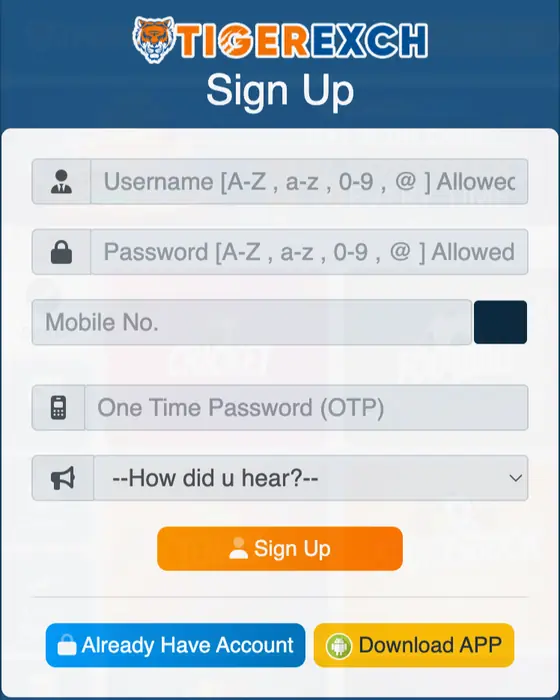
- Tap “Sign Up” at the top of the Tiger Exchange home screen.
- Pick a username and a password. The form allows letters, numbers and @.
- Enter your mobile number. Tap the button beside it for the OTP.
- Type the OTP. Pick an answer in “How did u hear?”.
- Tap “Sign Up”. “Already Have Account” takes you back to login.
A site sign-up gives you a login on that address only. A desk ID arrives with its address, deposit details and a reset route in one chat.
Tiger Exchange 365 login registration on other live addresses runs through their own sign-up box. Field names can differ.
Tiger Exchange demo ID
Look before you pay. The tigerexch ai login box carries a “Demo” button.
- Open a Tiger Exchange address. Tap “Login”.
- Tap “Demo”. The home screen opens with play balance.
- Open one cricket match. Place one play bet.
Demo balance cannot be withdrawn. Real play needs a real ID.
Lost Tiger Exchange ID or username
- Forgot the username?
- Scroll up in the chat. It sits in the message with your ID.
- Changed phone?
- Restore WhatsApp from backup. The chat and your ID come back with it.
- Chat deleted?
- Message the desk again. Give the username and your registered name.
- ID idle for months?
- Ask in the chat whether it is still active before depositing.
- Password lost?
- Reset steps: Tiger Exchange login password reset.
Tiger Exchange ID sawal jawab (Hinglish)
Tiger Exchange ID kaise banaye?
WhatsApp button dabao, “New Tiger Exchange ID” bhejo, desk ki details par UPI se pehla deposit karo aur screenshot bhejo. Username, password aur address usi chat mein aata hai.
Nayi ID banane ke liye kya chahiye?
WhatsApp, apne naam ka UPI ya bank account, aur desk maange to ek ID proof. Umar 18 saal ya zyada.
WhatsApp par ID ke liye kya message bheje?
Bas “New Tiger Exchange ID” likho. Koi username pasand ho to saath mein likh do. Deposit details desk usi chat mein bhejta hai.
Tiger Exchange ID banne mein kitna time lagta hai?
Fixed time ka wada yahan nahi hai. Desk deposit confirm karta hai, uske baad ID aati hai. Saaf screenshot ya UTR bhejne se jaldi hota hai.
Tiger Exchange ID ke liye KYC zaroori hai kya?
Ho sakta hai. Desk ID dene se pehle ID proof maang sakta hai. Saaf photo sirf isi WhatsApp chat mein do. Group, comment ya kisi aur number par kabhi nahi.
KYC complete hone ke baad bhi ID nahi aayi?
Usi chat mein deposit ka UTR aur apna naam dobara bhejo aur status poochho. Dobara payment mat karo.
Signup aur WhatsApp ID mein kya farak hai?
Site par signup se sirf us address ka login banta hai, reset bhi wahi site karti hai. WhatsApp ID ke saath address, deposit details aur reset ek hi chat mein milte hain.
ID lene se pehle minimum deposit kaise pata kare?
Chat mein poochho: “Minimum first deposit kitna hai?” Minimum har ID ke hisaab se desk batata hai. Jawab milne ke baad hi pay karo.
Tiger Exchange demo ID kaise milegi?
Login box mein “Demo” dabao. Demo account play balance ke saath khulta hai, koi signup nahi.
Demo khelne ke liye paisa dena padta hai?
Bilkul nahi. Demo play balance par chalta hai. Usme na deposit hota hai, na withdrawal.
ID milne ke baad pehla step kya hai?
Ek baar login karo aur starting password badlo. Phir chhota withdrawal test karo.
Purani ID hai to nayi ID chahiye kya?
Pehle purani ID ka status poochho. Login ya payment ki dikkat aksar usi ID par theek ho jaati hai.
Username aur password kahan milega?
Desk wali ID ka username aur password usi WhatsApp chat mein aata hai. Site signup mein aap khud chunte ho.
Account ka password pehle din kaise badle?
Login karo. Naya password screen aaye to wahin badlo. Na aaye to account menu mein “Change Password” dhoondo. Steps: first login.
Dusre agent ki ID yahan reset ho sakti hai kya?
Us ID ka account us agent ke paas hai. Desk se poochho, lekin us ID ka password kisi ko mat bhejo.
Ek ID app aur website dono par chalegi kya?
Haan, jab APK usi address se liya ho jis par ID bani hai. APK steps dekho.
ID ka current login address kahan milega?
Usi WhatsApp chat mein jahan ID mili thi. Address badle to wahin naya address maango.
ID lena aur app download karna alag hai kya?
Haan. Pehle ID lo, phir app ya browser se login karo. App se ID nahi banti.
Tiger Exchange ID FAQ
How do I get a Tiger Exchange ID?
Tap the WhatsApp button on this page, send “New Tiger Exchange ID”, pay the first deposit by UPI and share the screenshot. Your username, password and link arrive in the chat.
What should I send on WhatsApp to get a Tiger Exchange ID?
One line: “New Tiger Exchange ID”, plus a username you want if you have one. Pay the first deposit to the details sent back, then share the screenshot or UTR in the same chat.
Does my Tiger Exchange ID change when the address changes?
No. Username, password, balance and bets stay with the ID. Ask in the chat for the new address and log in there.
Is a TigerExch ID the same as a Tiger Exchange cricket ID?
Yes. One ID covers cricket, other sports and the casino.
Do I need to sign up on the Tiger Exchange website?
No. The WhatsApp route gives a ready ID. Sign Up on a Tiger Exchange site is the second route.
How long does a new Tiger Exchange ID take?
The ID follows once the desk confirms your first deposit. A clear screenshot or UTR speeds that up.
Can I have two Tiger Exchange IDs?
Ask the desk first. Login and payment problems get fixed on the ID you already have.
Can I change the mobile number on my Tiger Exchange ID?
Desk ID: ask in the chat. Site sign-up ID: open account settings. A number change can need a fresh OTP.
Is there a Tiger Exchange demo ID?
Yes. Tap “Demo” in the login box. Play balance only, no withdrawals.
Sign Up form fields copied from the live tigerexch ai screen on 22 September 2026. How an ID works and the WhatsApp message list added 14 October 2026.