
Tiger Exchange App and APK: Safe Setup on Your Phone
You can use Tiger Exchange on any phone without installing anything: open your address in Chrome or Safari, then pin it to your home screen. Want the Android app? Take it only from the “APK” button in the login box of the address your ID uses. This site hosts no app file and no download link.
- Safest route
- Browser plus a home-screen icon. Android and iPhone. Nothing to install.
- App route
- The WhatsApp desk sends your address. Its login box has the “APK” button.
- File seen
- TIGEREXCH.apk, 4.9 MB, on the tigerexch ai login box, 22 September 2026.
- Not verified
- That file came from a public site. The desk’s address can serve a different build.
- Phones
- Android. iPhone uses Safari.
- Play Store
- Not listed.
- Account
- The app does not create an ID. Get a Tiger Exchange ID first.
- On this site
- No app file. No download link.
File name and size read from the live file on 22 September 2026.
Tiger Exchange without the APK: the browser route
The app is optional. The same ID logs in through Chrome or Safari, with the same balance. There is no file to install and nothing for Play Protect to check.
- Ask the desk in your WhatsApp chat for the address your ID uses.
- Open it in Chrome on Android or Safari on iPhone. Match it letter by letter against the chat.
- Tap “Login”. Enter your username and password.
- Android: tap the three-dot menu in Chrome, then “Add to Home screen”. iPhone: follow the Safari steps.
- Open Tiger Exchange from that icon from now on. It always opens the address you checked.
Address changed? Delete the old icon and add the new address the same way.
Full login steps: Tiger Exchange login.
Phone safety checklist for Tiger Exchange
Six settings and habits. Each takes under a minute.
- Screen lock on. A PIN or fingerprint keeps your ID away from anyone who picks up the phone.
- Play Protect on. Leave it on, app or no app.
- “Install unknown apps” off. Settings, Apps, Chrome. Switch it on for one install only, then off again.
- One address. Type your password only on the address from your chat, never on links from groups, ads or comments.
- “Remember Me” on your own phone only. On a shared phone, log out when you finish.
- No PIN or OTP in chats. Nobody genuine asks for your UPI PIN or an OTP in a chat.
Tiger Exchange APK: install from your own login box in 6 steps
Only if you want the app. Six steps. Use Chrome on Android. Have your Tiger Exchange ID ready.
- Ask the desk in your WhatsApp chat for the address your ID uses. Open it in Chrome.
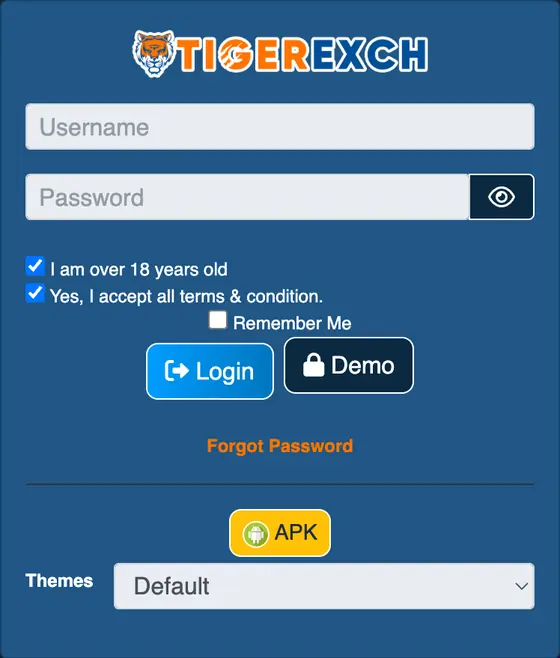
- Tap “Login”. Inside the login box, tap “APK”. The download starts.
- Wait for the file to finish. Check the name and size before you open it.
- Open the file. Android asks to allow installs from Chrome. That is the unknown-apps permission.
- Allow it for this install. Tap “Install”. If Play Protect offers a scan, let it scan.
- Open the app. Log in with your Tiger Exchange username and password.
Turn the permission off again: Settings, Apps, Chrome, “Install unknown apps”, off.
Login trouble inside the app: see Tiger Exchange login problems and fixes.
Ask for the APK address on WhatsAppTiger Exchange APK and Play Protect: three different warnings
Three messages can appear. They mean different things.
- Chrome caution
- “This type of file can harm your device.” Shown for APK files from outside the Play Store. Continue only if the address came from your desk chat.
- Unknown-apps permission
- A switch that lets Chrome install files. Allow it for one install. Turn it off after.
- Play Protect warning or block
- Google has found a problem with the app. Stop. Do not install it.
If Play Protect blocks or flags the Tiger Exchange APK, stop the installation and delete the file. Use the browser route, ask the desk to fix the file, and never turn Play Protect off to get past it.
Google keeps Play Protect on by default and recommends keeping it on. Source: Google Play Protect help.
Tiger Exchange app on iPhone
No APK for iPhone. Safari works instead.
- Open your Tiger Exchange address in Safari.
- Tap the Share icon at the bottom.
- Tap “Add to Home Screen”. Then “Add”.
The new icon opens the site full screen. Same login.
Tiger Exchange 365 Pro APK and Tiger 365 Pro login
Tiger 365 Pro runs on its own address. Its page carries a login box with “Demo Login” and self sign-up.
- Accounts. Made by the player on the Tiger 365 Pro site. A desk ID does not log in there.
- App. Take the APK only from that site’s own page.
- Old version. Skip it. Old builds can point to addresses that no longer load.
Whatever name the app goes by, install one build only: the one served on the address you log in to.
APK mirror sites can repackage betting apps with extra code, so install only the file served from your own login page.
Tiger Exchange app problems and fixes
Seven faults. One line each.
- Play Protect says harmful or blocks the install?
- Stop. Delete the file. Use the browser route. Tell the desk.
- Chrome warns about the file type?
- Normal for APKs outside the Play Store. Continue only if the address came from your desk chat.
- “App not installed”?
- Delete the older Tiger app first. Install again.
- “There was a problem parsing the package”?
- The file arrived broken. Delete it. Download again.
- Install stuck?
- Free 100 MB of storage. Retry.
- Blank screen after opening?
- Switch to mobile data. Close and reopen the app.
- Login fails in the app, works in Chrome?
- Keep using Chrome. Ask the desk for a fresh APK. Fixes: login problems.
Tiger Exchange app or browser
| App (APK) | Browser | |
|---|---|---|
| Phones | Android | Android and iPhone |
| Install | 4.9 MB file (tigerexch ai build) | None |
| Address changes | Ask the desk if the app still works | Open the new address |
| Updates | Install the new APK from the same login box | Nothing to do |
| Login | Same username and password, same address | |
First week on Tiger Exchange: use the browser. Move to the app after your first withdrawal lands.
Tiger Exchange app sawal jawab (Hinglish)
Tiger Exchange APK kahan se download kare?
Desk se WhatsApp par apni ID ka address maango. Us address ke login box mein “APK” button hai, wahin se file lo. APK mirror sites se mat lo.
Login box mein APK button kahan hai?
“Login” dabao. Box ke neeche peela “APK” button dikhega, “Forgot Password” ke neeche.
Tiger Exchange app Android mein install kaise kare?
File kholo, Chrome ko ek baar install ki permission do, “Install” dabao. Play Protect scan maange to scan karne do. Upar ke 6 steps dekho.
Play Protect ne Tiger Exchange APK rok diya, ab?
Wahin ruk jao aur file delete kar do. Play Protect off mat karna. Chrome se login karo aur desk ko batao ki file flag hui.
Unknown apps permission off kaise kare?
Settings, Apps, Chrome, “Install unknown apps”, phir switch off. Install ke baad yeh zaroor band karo.
Tiger Exchange bina APK install kiye kaise khole?
Chrome ya Safari mein desk wala address kholo aur “Login” dabao. Same ID chalti hai. App zaroori nahi hai.
Bina app ke Tiger Exchange ka icon kaise banaye?
Chrome mein apna address kholo, teen dot wala menu dabao, “Add to Home screen” chuno. iPhone par Safari ka Share button, phir “Add to Home Screen”.
Tiger Exchange iPhone mein kaise use kare?
iPhone ke liye APK nahi hai. Safari mein address kholo, Share dabao, “Add to Home Screen” chuno. Icon app jaisa khulega.
Play Store wali Tiger app same hai kya?
Nahi. Tiger Exchange ka APK Play Store par listed nahi hai. Play Store par “Tiger” naam ke gold, silver ya trading apps alag cheez hain.
Tiger Exchange APK “not installed” error aaye to?
Purani Tiger app pehle delete karo, phir dobara install karo. Phone mein 100 MB jagah khali rakho.
APK parsing error kya kare?
Download adhoora raha. File delete karo aur login box se dobara download karo.
App blank screen aa rahi hai to?
Mobile data par switch karo, app band karke phir kholo. Phir bhi blank ho to browser se login karo.
Tiger Exchange app update kaise kare?
Naya APK usi login box se lo aur purani app ke upar install karo. Kaam na kare to purani app hata kar install karo.
Tiger Exchange APK old version kaam nahi kar rahi?
Purana version mat dhoondo. Purani build band address kholne ki koshish kar sakti hai. Desk se current address lo aur wahan ka APK lo.
Ek hi ID app aur Chrome dono mein chalegi?
Chalegi, agar APK usi address ke login box se liya ho jis par aapki ID chalti hai.
APK file size kaise check kare?
Download hone ke baad Chrome ke Downloads mein file ka size dikhta hai. 22 September ko tigerexch ai wali file 4.9 MB thi. Desk ka address alag build de sakta hai.
Tiger 365 Pro APK mein desk ID chalegi kya?
Nahi. Tiger 365 Pro ki accounts usi site par khud banti hain. Desk ki ID desk wale address par hi login hoti hai.
Tiger Exchange app FAQ
Do I need the app to use Tiger Exchange?
No. Chrome or Safari opens the same ID and balance. Add your address to the home screen for an app-like icon.
Can I download the Tiger Exchange APK from this site?
No. This site hosts no app file. The APK comes only from the “APK” button in the login box of the address your ID uses.
Is the Tiger Exchange app on the Play Store?
No. It is an APK from the “APK” button in the Tiger Exchange login box.
How big is the Tiger Exchange APK?
The tigerexch ai file was TIGEREXCH.apk, 4.9 MB, on 22 September 2026. The address your ID uses can serve a different build.
Is the Tiger Exchange APK safe to install?
No page can promise that. Take it only from the login box of the address the desk gave you, keep Play Protect on, and stop if Play Protect flags it.
Does the Tiger Exchange app work on iPhone?
There is no APK for iPhone. Open your address in Safari, tap Share, then “Add to Home Screen”.
Tiger Exchange app download kaise kare?
Desk se address lo, Chrome mein kholo, “Login” tap karo, phir “APK”. File download hone ke baad install allow karo.
Can I use the same ID on the app and the website?
Yes, when the APK comes from the same address your ID logs in on.
APK file name and size read from the live tigerexch ai file on 22 September 2026. Play Protect guidance follows Google’s help page. Browser route and phone safety checklist updated 14 October 2026.